
Floating Apps (multitasking)
In-app purchases

star
3.71K reviews

Rated for 3+
info
50K+
Downloads


About this app
Experience real multitasking on your Android!
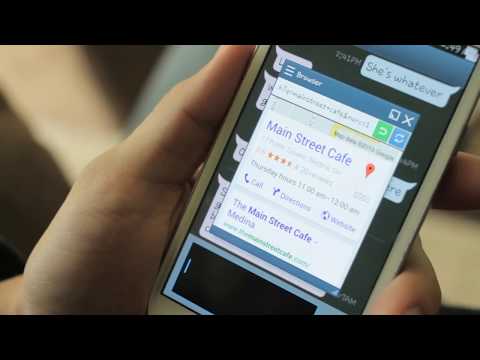
Open more apps at the same time in floating windows and enjoy real multitasking! Don't leave current app for a small task... Floating Apps is the largest and the most advanced collection of floating mini apps available on Google Play!
• watch YouTube & movies while using your phone for other things
• take notes or use calculator anywhere & anytime
• view email attachments without leaving email app
• view multiple PDF files at the same time
• open links in floating browser and view them later
• translate vocabularies without leaving current app
• and do much much much more...
Supported languages: EN, IN, CS, DA, DE, ES, FR, IT, LT, PL, PT-BR, PT-PT, RO, SK, SV, VI, TR, RU, UK, KO, JA, HI, TH, ZH-TW, TH-CN, FA, AR, HU
If you have any problem with the app, contact us via fa@lwi.cz for help!
---
Floating Apps comes with more than 41 floating apps including:
• Floating Browser
• Floating Notes
• Floating Document Viewer (PDF, DOC, DOCX, ODT and more)
• Floating Calendar
• Floating Youtube
• Floating Facebook
• Floating Twitter
• Floating Google+
• Floating Calculator
• Floating Contacts
• Floating File Manager
• Floating Music Player
• Floating Video Player
• Floating Image Viewer
• Floating Audio Recorder
• Floating Translator
• Floating Paint
• Floating Google Maps
• Floating Wifi Manager
• Floating Games
• and 21 more apps (see https://www.floatingapps.net for full list of 41 floating apps)...
• also, you can create your own floating apps from home screen widgets and URLs!
---
Our Commitment
Floating Apps is the best of its kind because of our commitment and never-ending work. We love to do it for you!
• We're always doing our best to help our users, so you're not left alone.
• We're developing Floating Apps for more than 5 years and it keeps getting better and better.
• We're listening to your requests and designing apps and features for you.
The Most Advanced Features
• Stop switching from one app to another and experience real multitasking with floating mini apps that make your life easier!
• Do not find the right floating app for you? Turn homescreen widgets and URLs into your very own floating apps.
• Access floating apps anywhere and anytime without leaving what you are just doing with Floating Menu and Quick Launch.
• Extremely powerful floating menu allows you to access not only floating apps, but also normal and recent apps and shortcuts!
• Access floating apps with one tap via movable & resizable quick launch icon that stays always on top of other apps.
• Move windows by simply dragging their title, resize them by dragging their bottom bar. Arrange windows your way!
• Maximize the floating app to utilize the whole screen. Minimize it if you don't need it now and restore it later.
• Easily access advanced features & functions, control the window, its borders and transparency with context menu!
• Open links, videos or images using floating apps the same way as you do with normal apps. Use shortcuts, notifications and more.
• It's just like multiviews / multi windows on Samsung or split screen mode but for all Androids!
Links
Web: https://www.floatingapps.net
Facebook: https://fkdaysuqv57elvyggh9nk6.campbell-road.com/FloatingApps
Twitter: https://twitter.com/FloatingAppsNet
Google+: https://plus.google.com/+FloatingappsNet
Feedback: https://floatingapps.uservoice.com
Testers Community: https://plus.google.com/communities/111601071691478533219
Permissions
Please see complete list at http://www.floatingapps.net/permissions.
Open more apps at the same time in floating windows and enjoy real multitasking! Don't leave current app for a small task... Floating Apps is the largest and the most advanced collection of floating mini apps available on Google Play!
• watch YouTube & movies while using your phone for other things
• take notes or use calculator anywhere & anytime
• view email attachments without leaving email app
• view multiple PDF files at the same time
• open links in floating browser and view them later
• translate vocabularies without leaving current app
• and do much much much more...
Supported languages: EN, IN, CS, DA, DE, ES, FR, IT, LT, PL, PT-BR, PT-PT, RO, SK, SV, VI, TR, RU, UK, KO, JA, HI, TH, ZH-TW, TH-CN, FA, AR, HU
If you have any problem with the app, contact us via fa@lwi.cz for help!
---
Floating Apps comes with more than 41 floating apps including:
• Floating Browser
• Floating Notes
• Floating Document Viewer (PDF, DOC, DOCX, ODT and more)
• Floating Calendar
• Floating Youtube
• Floating Facebook
• Floating Twitter
• Floating Google+
• Floating Calculator
• Floating Contacts
• Floating File Manager
• Floating Music Player
• Floating Video Player
• Floating Image Viewer
• Floating Audio Recorder
• Floating Translator
• Floating Paint
• Floating Google Maps
• Floating Wifi Manager
• Floating Games
• and 21 more apps (see https://www.floatingapps.net for full list of 41 floating apps)...
• also, you can create your own floating apps from home screen widgets and URLs!
---
Our Commitment
Floating Apps is the best of its kind because of our commitment and never-ending work. We love to do it for you!
• We're always doing our best to help our users, so you're not left alone.
• We're developing Floating Apps for more than 5 years and it keeps getting better and better.
• We're listening to your requests and designing apps and features for you.
The Most Advanced Features
• Stop switching from one app to another and experience real multitasking with floating mini apps that make your life easier!
• Do not find the right floating app for you? Turn homescreen widgets and URLs into your very own floating apps.
• Access floating apps anywhere and anytime without leaving what you are just doing with Floating Menu and Quick Launch.
• Extremely powerful floating menu allows you to access not only floating apps, but also normal and recent apps and shortcuts!
• Access floating apps with one tap via movable & resizable quick launch icon that stays always on top of other apps.
• Move windows by simply dragging their title, resize them by dragging their bottom bar. Arrange windows your way!
• Maximize the floating app to utilize the whole screen. Minimize it if you don't need it now and restore it later.
• Easily access advanced features & functions, control the window, its borders and transparency with context menu!
• Open links, videos or images using floating apps the same way as you do with normal apps. Use shortcuts, notifications and more.
• It's just like multiviews / multi windows on Samsung or split screen mode but for all Androids!
Links
Web: https://www.floatingapps.net
Facebook: https://fkdaysuqv57elvyggh9nk6.campbell-road.com/FloatingApps
Twitter: https://twitter.com/FloatingAppsNet
Google+: https://plus.google.com/+FloatingappsNet
Feedback: https://floatingapps.uservoice.com
Testers Community: https://plus.google.com/communities/111601071691478533219
Permissions
Please see complete list at http://www.floatingapps.net/permissions.
Experience real multitasking on your Android!
Updated on
Safety starts with understanding how developers collect and share your data. Data privacy and security practices may vary based on your use, region, and age. The developer provided this information and may update it over time.
- No data shared with third partiesLearn more about how developers declare sharing
- This app may collect these data typesLocation, App activity and 2 others
- Data is encrypted in transit
- Data can’t be deleted


Ratings and reviews
3.08K reviews

David Ferrari
- Flag inappropriate
September 19, 2026
Treat app. Two things: sometimes the app display a "X" button at the lower center of the screen and I'm unable to close or click anything around it. Need to force close the app to it to be gone. not sure if it's an ad (I paid for the full version) that is blocked by adguard and bugs out or something else. A request. it's a great all to play "idle" games that run online, but we are unable to use multiple game accounts with it cause all "my apps" shortcut share the cache and login credentials
LWi s.r.o.
September 21, 2026
Hi, thank you for your comment!
It's a close button for minimized bubble that, for some reason, doesn't disappear. We will have a look at it.
We are testing private browser concepts as well.

Peter Phichitsurakij
- Flag inappropriate
- Show review history
September 4, 2026
Update: Your latest update fixes the note saving problem. All is working fine now. Thank you! // Notes are supposed to be automatically saved, but on my android 10 phone with the correct storage permissions, does not save any notes. No errors either. Can you help?
2 people found this review helpful
LWi s.r.o.
September 4, 2026
Hi, thank you for your feedback. Glad to hear that everything works for you now!

Peter Lee Budi Banjarmasin
- Flag inappropriate
August 26, 2026
please make It possible to have more than 3 columns in the floating menu. a lot of apps can be seen at once when there are more than 3 columns. seems like a big disadvantage to use only 3 columns. a lot of vertical scrolling to find an app. please make it possible to add several more columns. thank you
2 people found this review helpful
LWi s.r.o.
August 31, 2026
Hi, thank you for your feedback, we will have a look at it.
What’s new
Two small things that make the day easier.
BROWSER: Choose your search engine right on the welcome page.
PAINT: A bigger palette. Every colour family has a light, a full and a dark tone.
Plus many important fixes, more speed and better stability.
BROWSER: Choose your search engine right on the welcome page.
PAINT: A bigger palette. Every colour family has a light, a full and a dark tone.
Plus many important fixes, more speed and better stability.
App support
About the developer
LWi s.r.o.
info@lwi.cz
Mlýnská 326/13
602 00 Brno
Czechia
+420 773 241 878


